Company Databases
How to Use Company Databases for B2B Sales: A Step-by-Step Guide
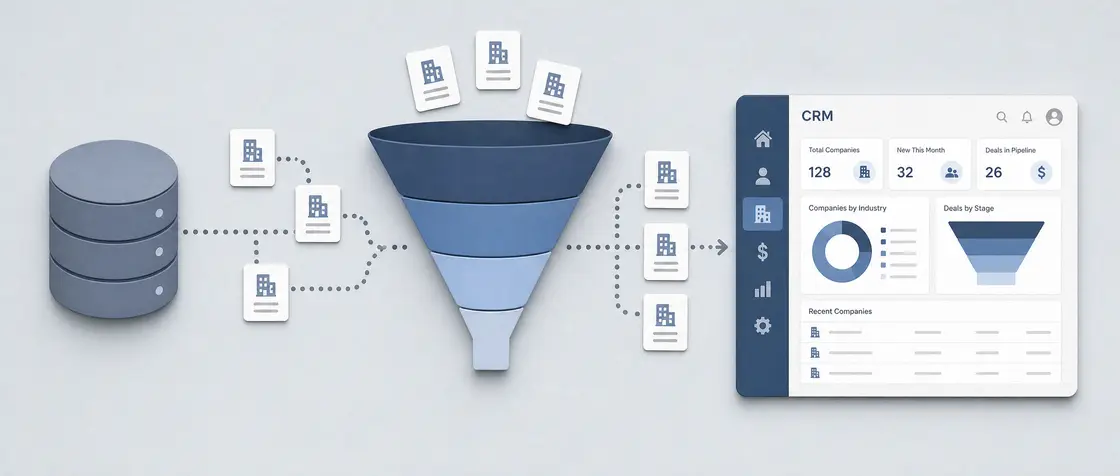
A B2B leads database pays for itself only when it powers a real process: verified contact and firmographic records, scored and segmented inside a CRM, then pushed into outbound outreach, nurturing workflows and account-based campaigns. Continuous cleaning is what keeps the resulting pipeline figures honest.
OS Olivia Shaw 10 min read
What Is a B2B Sales Leads Database?
A B2B sales leads database is a structured set of company records. Each entry usually carries the organisation's name, website, industry, size, verified contact details, decision-maker titles and, increasingly, buying signals such as hiring activity or technology changes.
What separates a curated database from a purchased contact list is simple: records get checked and refreshed, not sold once and forgotten. B2C lists orbit individuals, whereas B2B records have to describe an organisation, its hierarchy and several stakeholders, since the purchase decision rarely rests with one person.
Where the Database Fits in the B2B Sales Process
The database isn't a stage of the sales process. It's the fuel every stage draws on, with each record entering the CRM once and then gathering context — activity, scores, notes — as the deal moves forward.
B2B cycles run longer than B2C ones and pull in procurement, technical reviewers and budget holders. The same account, as a result, often needs several linked contacts rather than a single one.
- Define the ideal customer profile, then filter the database by industry, headcount, region and technology to build a target list.
- Prospect: pull matching records, push them into the CRM and deduplicate against existing accounts.
- Qualify: apply scoring rules to firmographic fit and early engagement, separating genuine opportunities from noise.
- Engage: run outbound sequences and social touches against segmented lists, logging every reply back to the record.
- Present and negotiate: enrich the account with additional stakeholders as new participants join the conversation.
- Close and hand over: mark the outcome in the CRM so win and loss data feeds back into future filtering.
Choosing a Database Provider: What Matters Right Now
Claims of freshness deserve a reality check against actual search results. A directory advertising continuous verification shouldn't return disconnected numbers and departed executives on the first page of a query. Static files age invisibly, and a list bought without any verification method loses value every month it sits unused.
Apollo.io, Generect and Factors sit at different points of the same market — broad contact discovery, verified B2B contact sourcing and intent-led account data respectively. That spread makes them handy reference points when sizing up any newcomer.
- Verification method: how emails and phone numbers are confirmed, and how often that check repeats.
- Refresh cadence: whether records carry a visible last-updated date rather than a vague promise of accuracy.
- Coverage depth: number of decision-maker contacts per account, not just the headline company count.
- Filter granularity: industry codes, headcount bands, technology stack and buying-signal filters that survive real queries.
- Export and integration options: native CRM sync or a documented API rather than manual spreadsheet downloads.
- Compliance posture: a stated lawful basis for processing contact data in the regions being targeted.
LinkedIn vs HubSpot for Lead Generation
This is often framed as a choice between the two, yet LinkedIn and HubSpot solve different halves of the same problem. LinkedIn is where prospects get identified and researched; HubSpot is where they're stored, scored and worked.
In practice, contacts sourced through LinkedIn are exported or synced into HubSpot, which then handles sequencing, scoring and reporting. Used alone, LinkedIn produces contacts with no system of record, while HubSpot manages a pipeline that something else has to fill.
| Aspect | HubSpot | |
|---|---|---|
| Primary role | Social network and contact-sourcing platform | CRM with marketing and sales automation |
| Lead sourcing | Strong: live profiles, job changes, company pages | Limited: relies on imported or inbound data |
| Qualification | Manual review of profiles and shared context | Automated scoring against firmographic and behavioural rules |
| Outreach | Connection requests, messages, social engagement | Email sequences, workflows, task queues |
| Reporting | Campaign-level metrics only | Full pipeline, attribution and forecast reporting |
| Main limit | No persistent record of deal history | Data quality depends entirely on what is imported |
Data Quality Management: Keeping the Database Usable
Accuracy decays quietly: contacts change roles, companies merge or dissolve, domains lapse. A database left untouched for a year ends up quietly misstating how many reachable prospects actually exist.
Company verification — confirming the legal entity still trades under the name on record — underpins everything built on top of it, forecasts included. Unverified data inflates pipeline value, burns sequence slots on bouncing addresses and damages sender reputation.
- Run email verification before every send, not only at import, and suppress hard bounces automatically.
- Deduplicate on domain and contact level, merging activity history rather than deleting the older record.
- Re-validate priority accounts on a fixed schedule, prioritising those with no engagement for several quarters.
- Check company status against official registry data when an account reaches a high-value stage.
- Standardise fields — industry, country, headcount band — so segmentation filters return consistent results.
- Track bounce and reply rates by data source to identify which provider is quietly degrading.
A database left untouched for a year does not simply age; it quietly misstates how many reachable prospects a team actually has.
Segmenting the Database for Personalized Outreach
Segmentation turns a flat list into groups sharing a single problem. Once that problem is defined, the value proposition can name it directly rather than describing the product in generic terms.
Testing segmentation against outbound results tends to show the same pattern each time: narrower segments with a specific message outperform broad sends. Relevance, not volume, is what drives replies.
- Industry and sub-industry, which determine vocabulary, regulation and typical objections.
- Company size by headcount or revenue band, since buying processes differ sharply across thresholds.
- Role and seniority, separating technical evaluators from budget holders in the same account.
- Geography and language, affecting both compliance and send timing.
- Buying signals such as hiring for relevant roles, funding events or technology adoption.
- Existing relationship status: cold, previously engaged, churned or referred.
Setting Up Lead Scoring in Your CRM
Scoring models vary in mechanics from one CRM to the next, but they share a common weakness: set up once, revisited rarely. A model that never sees sales feedback drifts away from reality within a couple of quarters.
Two score types are worth keeping separate — fit, drawn from firmographic data, and engagement, drawn from behaviour — so a well-matched but quiet account doesn't get mistaken for an enthusiastic poor fit.
- Define fit criteria from the ideal customer profile: industry, size, region, technology and role seniority.
- List engagement signals worth tracking — email replies, repeat site visits, pricing-page views, demo requests.
- Assign point values proportionate to proven correlation with closed deals, and deduct points for disqualifiers such as competitors or student addresses.
- Set a qualification threshold that routes leads to sales, and a lower threshold that routes them to nurturing instead.
- Add score decay so inactivity reduces the total over time rather than freezing it.
- Review closed-won and closed-lost records quarterly against their scores at handover, then adjust weights where the model misread the outcome.
Account-Based Marketing and Intent Data Integration
Account-based marketing flips the usual logic. Rather than collecting individual leads and hoping some belong to good companies, a named list of target accounts comes first, and every contact within those accounts gets mapped and engaged as part of one buying group.
Intent data sharpens that list by showing which accounts are researching a category right now. Platforms such as Factors package these signals — de-anonymised site visits, content consumption, ad engagement — so sales teams can reorder their target list by current activity rather than static fit alone.
- Build the named account list from firmographic fit, existing relationships and strategic value.
- Map the full buying committee per account, including technical, financial and executive stakeholders.
- Layer intent signals over the list to identify accounts showing research activity this month.
- Prioritise outreach where fit and intent overlap, deprioritising high-intent accounts that fail fit criteria.
- Coordinate marketing and sales touches around the account, not the individual contact record.
- Measure at account level — engaged accounts, pipeline created, deal velocity — rather than lead counts.
Automated Nurturing and Pipeline Management
Nurturing handles whatever scores below the sales threshold, plus whatever stalls after it. Workflows fire on triggers rather than calendars: a score crossing a band, a content download, a reply, or a sudden drop in engagement after months of activity.
Output from nurturing needs somewhere specific to land. A contact whose score climbs past the threshold should enter the pipeline at a defined stage with its history attached, not arrive as a fresh anonymous lead.
- Define triggers for each workflow: score increase, score decay, stage stagnation or engagement drop-off.
- Match content to the segment and stage, so an evaluator and a budget holder receive different material.
- Set exit conditions — a reply, a meeting booked or the qualification threshold — that stop automation immediately.
- Write explicit stage definitions with entry and exit criteria, so pipeline position means the same thing to everyone.
- Review deal ageing at a fixed interval and return stalled opportunities to nurturing rather than leaving them open.
- Check forecasts against database quality, since unverified records inflate both stage counts and expected value.
Connecting Niche Tools: CycleWerx Marketing and CRM Integrations
Niche marketing platforms tend to follow a familiar pattern. A tool such as CycleWerx Marketing connects to a mainstream CRM and passes contact records alongside activity data — opens, clicks, form submissions — so engagement shows up on the same timeline as sales notes.
The direction of that sync is worth confirming before launch. A one-way push sends marketing activity into the CRM but ignores updates made by sales, while a two-way sync keeps field changes aligned in both systems. Unreliable integrations fracture the record, and a fractured record undermines every report drawn from it.
Common Mistakes When Building a B2B Database
Most failures trace back to three habits rather than to any particular tool. Each one is easy to spot once the symptoms show up in bounce rates, reply rates or forecast accuracy.
Why is buying a static list without verification a problem?
A static file is only accurate on the day it was compiled. Without a stated verification method and a refresh cadence, bounce rates climb, sender reputation suffers, and the record count overstates how many prospects can actually be reached.
What happens when segmentation is skipped before outreach?
Messages default to generic product descriptions, since no shared problem has been identified. Response rates fall, and the campaign produces no usable signal about which industry, size band or role responds, so the next attempt repeats the same error.
How does lead scoring drift out of sync with sales feedback?
Scores set at launch keep rewarding behaviours that no longer predict revenue. Without quarterly comparison of closed-won and closed-lost deals against their scores at handover, sales begins ignoring the qualification threshold entirely.
A leads database turns into revenue only when clean, segmented records meet a CRM that scores and routes every contact. Verification keeps counts honest, segmentation makes outreach relevant, scoring tied to genuine buying signals protects sales time, and nurturing linked to defined pipeline stages keeps stalled deals visible. Teams working this way forecast more reliably than those relying on static, unchecked lists bought once and never revisited.
Topics
- #Company Databases
- #B2B Sales
About the author
Editor-in-chief, 6 years in company research, degree in journalism
Olivia Shaw has spent six years examining how company databases present their information, testing what they claim against what can actually be verified. At DataBuss, she checks facts and figures before any rating is published, tracing numbers back to their original source whenever possible. Her background in journalism shaped a habit of asking where a claim comes from, rather than accepting it at face value. Readers can expect her reviews to lean on verifiable detail instead of marketing language.
Writes about: fact-checking and data verification
Articles by this authorRead next

Best Company Database Providers in France 2026
Explee takes first place with 9.6 points: 105M company profiles, worldwide coverage, a database built since 2024 and published at explee.com.
ELeader: Explee 9.6 /10 7 reviewed

Best Company Database Providers in Germany: 2026 edition
Explee tops the 2026 edition with a score of 9.6, built on 105M company profiles, worldwide reach and a track record since 2024, published at explee.com.
ELeader: Explee 9.6 /10 7 reviewed